Program is Exported. Containers cannot be modified.
Sr
Container No
Size
Export Date
Truck No
Status
Gate Out Photos
Action
Gate-In EIR
Step 2: Inspection / Photos
EIR Register (Current Visits)
Operational Gate-In EIRs for current Yard visits only. Full visit history is on the Dashboard.
0 EIRs selected
Gate-In EIR Header
Container Inspection
Photos / Documents
Container Case File
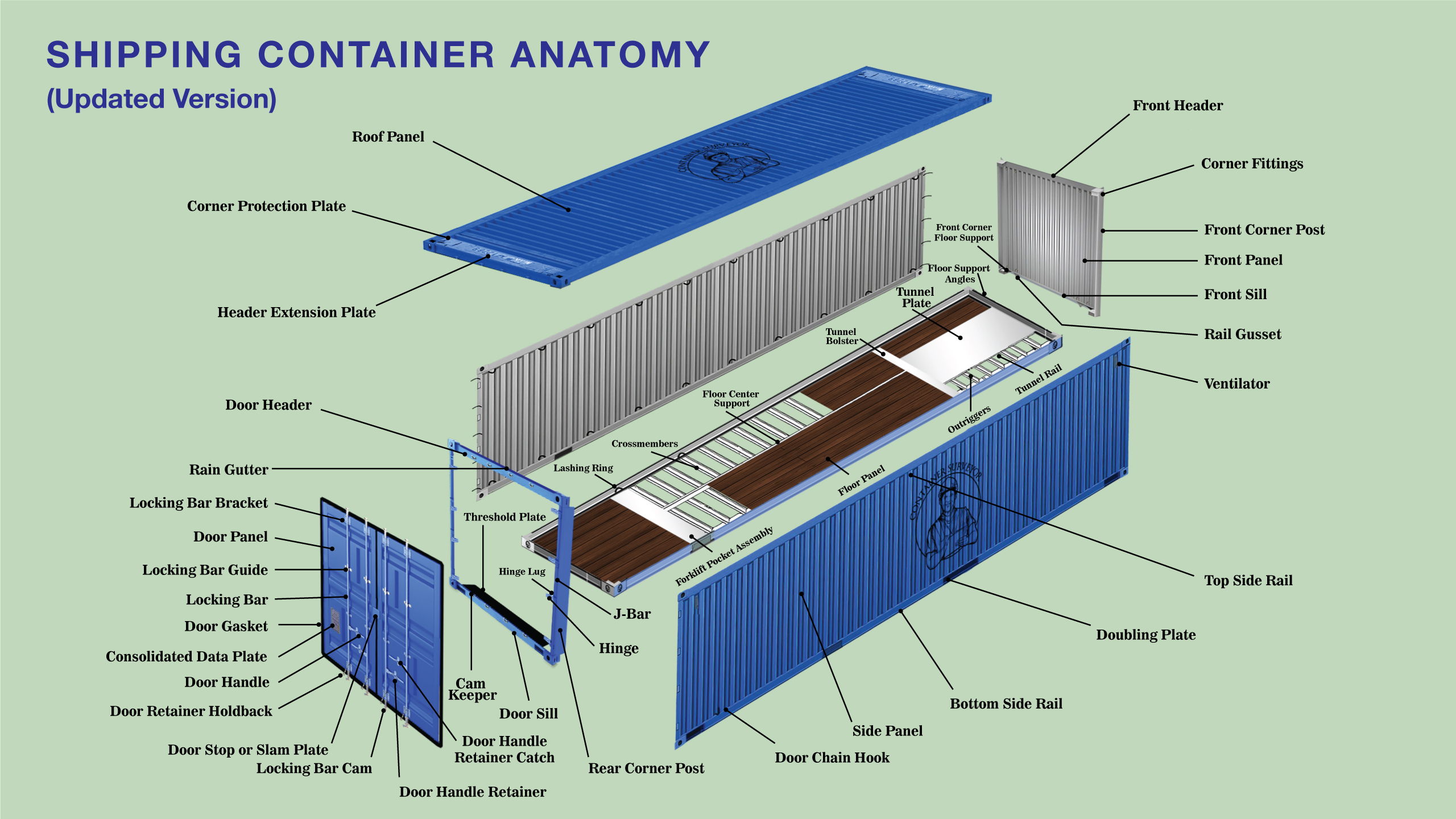
Container Parts Guide
Roof PanelCorner Protection PlateHeader Extension PlateFront HeaderCorner FittingsFront Corner PostFront PanelFront SillRail GussetVentilatorTop Side RailDoubling PlateBottom Side RailSide PanelDoor Chain HookRear Corner PostDoor HeaderRain GutterLocking Bar BracketDoor PanelLocking Bar GuideLocking BarDoor GasketConsolidated Data PlateDoor HandleDoor Retainer HoldbackDoor Stop or Slam PlateLocking Bar CamDoor Handle RetainerDoor Handle Retainer CatchThreshold PlateHinge LugHingeCam KeeperDoor SillLashing RingCrossmembersFloor Center SupportTunnel BolsterTunnel PlateFloor Support AnglesFront Corner Floor SupportFloor PanelTunnel RailOutriggersForklift Pocket Assembly
Select a repair itemPart select karen, phir description choose karen.
Damage Type
Damage Estimate List
Estimate changes stay on this screen until you click Save Estimate.
SR
AREA
DESCRIPTION
CODE
LC
MC
LH
QTY
AMOUNT
ACTION
Gross Estimate Amount: PKR 0
Discount Amount PKR 0Net Estimate Amount PKR 0
Additional Estimate Photos
Estimator close-up photos
Upload extra estimate close-up photos here. Gate-In EIR photos are linked above as read-only references.
Repair Details
After Approval
Approved Estimate
Selected approval rows
Sr
Area
Description
Code
LC
MC
LH
Qty
Amount
Status
Approved amount from selected rows.
Approved Amount: 0
Repair Completion Photos
After repair photos
Upload repaired damage area photos here. These photos will be included in the Repair Completion PDF.
Repair Code / Rate List
Code
Description
Part
LC
MC
LH
Rate
Edit
User Management
Admin email verified
Change Temporary Password
Please set your private password before using the system.
Create New Staff User
Admin manually enters the staff password. Nothing is generated automatically.
Create Mode
Staff Permissions
Grouped by software area
Name
Email
Role
Status
Permission Summary
Password Change Required
Last Login
Action
Staff Password Reset Requests
Requested By
Email
Role
Requested At
Action
Open User Management to load requests.
Change My Admin Password
Admin account
Change Verified Admin Email
Verified recovery email
Customer Accounts
Admin only
Company Name
Name
Email
Phone Number
Email Verified
Account Status
Created Date
Action
Open Customer Accounts to load customers.
Advanced Options
Type BASIC MODE to turn all off
Display Names
Screen and print only
Original name stays in the database. Change the name you see on Dashboard, yard condition, Damage Estimate print, EIR print, and yard print. Example: saved as Damage, you can show Damaged or any word you want.
Admin Approval Center
Permission requests
User
Role
Action
Module
Container
Record ID
Reason
Date
Status
Action
Notification Center
Permission updates
Action History
Admin log
Who Requested
Who Approved
Action
Module
Container
Record ID
Date Time
Result
Media Integrity
Admin only
Orphan files are not referenced by current app data. Archive only after backup.